Pest control software that saves every stop on the phone first.
A phone app for your techs, a website for your office and an app for you. The phone app sends each stop when there’s signal. A visit won’t close while it’s missing what Arizona’s record rule lists. And if you’re on PestPac, FieldRoutes or GorillaDesk, your old system keeps running while you check the move.
The first few companies start free while we set them up. The demo is a made-up company; tap anything.

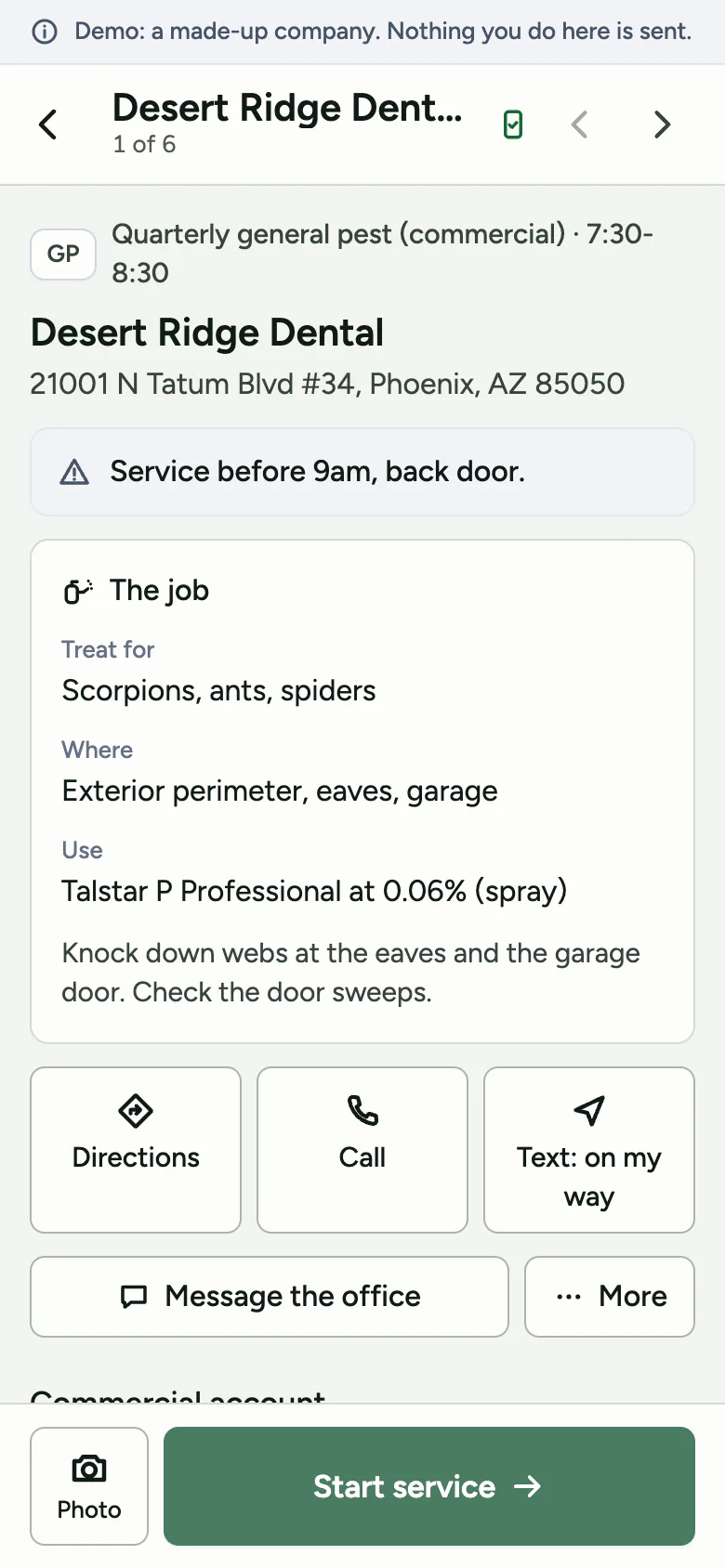
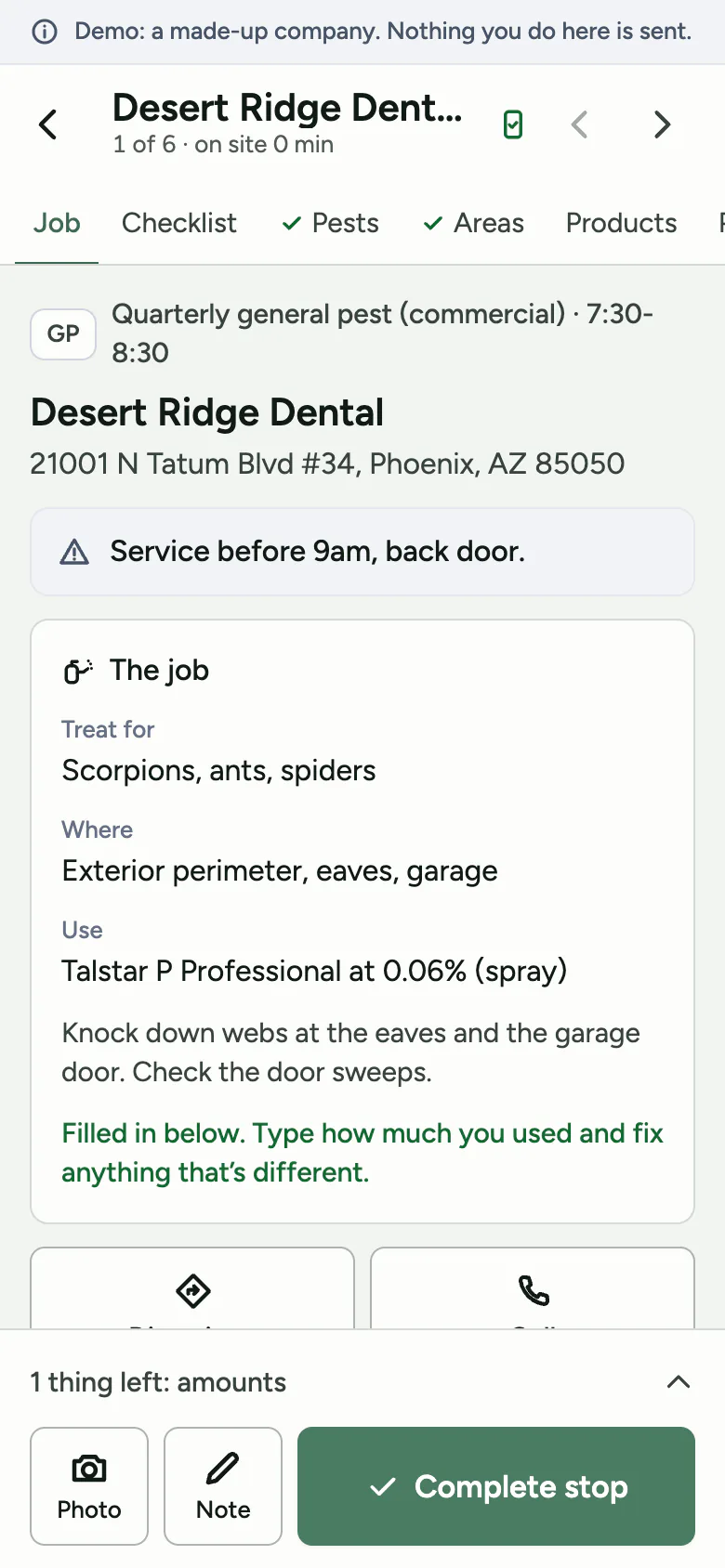
Every tap is saved on the phone first, then sent when there’s signal.
A tech’s phone keeps its own copy of the day. Start, products, photos, bait stations, signature, done: it saves as they go and sends when there’s signal. If the phone itself is lost or broken before it has sent, what was only on it is gone. We’ve tested this in three browser engines and in automated tests, not yet on a tech’s own phone.
- The screen doesn’t reload under their thumbs.What a tech types saves on the phone as they go, and the screen isn’t reloaded over their typing.
- One login per tech.Each tech joins with an invite from your office and makes their own login. The office can remove a login at once.
- Location is read once.Looking at a stop does nothing. Start service is one tap. It reads the phone’s location that once, to check how far it is from the address, so the office can see the stop was started at the house. The app doesn’t read location in the background.
Why we built it this way. We read the one-to-three-star reviews of the apps pest companies use now. Of 442 low-rated Google Play reviews, 159 mention crashes, freezes or slow loading, 53 lost work or erased notes, and 13 no signal and no work (our count, October 2026, from reading what each review says).
It tracks the 30-day due date and builds the file for you to upload.
Arizona wants a termite report, the TARF, within 30 days of completing a pretreatment, a new-construction treatment, a final grade treatment, a first corrective treatment, or a wood destroying insect inspection report. Barrierline keeps the list for you: which are due, which are late, which are ready for the state’s file and which need something first. One click downloads the state’s file. You still send it in; Barrierline gets it ready. And a visit won’t close while it’s missing what Arizona’s record rule lists.

The Records page. Every product application, with product, EPA number, amount, where, target and the applicator’s license number. Search it while a customer is on the phone. Export it when an inspector asks. Its State rules view lists the state’s records and says which ones Barrierline keeps and which to keep on paper for now.
Your data comes in with you, and it leaves with you.
Owners and office managers write on review sites that leaving their old software is hard: getting the data out, cancelling, and moving over by hand. So the move is the careful part of what we do.
- We’ve built readers for PestPac, FieldRoutes, GorillaDesk and Jobber files.They use each system’s own column names, as far as we could confirm them, and have only been tried on made-up files. None has been run on a real company’s export yet, so you’d be one of the first real ones. From ServSuite, Briostack, Pocomos, Housecall Pro, Service Autopilot, ServiceTitan or a plain spreadsheet, send what it exports and we match the columns with you before anything is saved.
- You check it before anything is saved.Look-alike customers are put side by side for you to decide. Nothing is merged behind your back.
- You can undo it, and your old system keeps running.A move can be undone for 30 days. Cancel the old one on the day you choose, once you know where your last 3 years of application records will live.
- Getting your data out is built in.Settings, then Download everything: every customer, plan, visit, record and tech as spreadsheets, any time. You don’t have to ask us, and there’s no fee.

The Move in page. Pick your system and it lists what to export, report by report. It says what the move is built to bring over, as far as your export has it: customers, plans, booked appointments, balances, techs and products.
Switch day, step by step.
About 90 minutes to set up and check, then a few minutes a day in week one. A first move has never been timed.
-
You
Send the files.
Export from your old system as spreadsheets (CSV or Excel). If it can only give you a PDF, a backup or a ZIP, send that, and we read it on our own computer. The privacy policy says how, and when the copies are deleted. Your office manager can do it. Nothing changes for your techs yet.
-
Us
We prepare the move.
We read your files and set up your customers, plans, products and techs.
-
You
You look at it.
A preview shows what came across, in plain words. You check the totals against the numbers your old system’s own reports give. Problems are listed with what to do about each. Look-alike customers are shown side by side. Nothing is saved yet.
-
You
You move in.
You approve it, and it goes in as one batch. If it’s wrong, undo it. You have 30 days.
-
You
Check three customers you know.
Open them on the website and on a phone. Then send each tech an invite. Your old system can keep running until you pick the day to stop.
What their users complain about, and what we do instead.
We read 664 negative reviews of the apps pest companies use now: 442 on Google Play and 222 on the App Store, one to three stars, October 2026. We have no customers yet, so these are their users’ words, counted by us. These are the complaints that bear on your records, your paperwork and your move, and what Barrierline does about each.
| Their users complain about | Reviews that mention it | What Barrierline does |
|---|---|---|
| Crashes, freezes and slow loading | 159 of 442 | Screens read from the phone’s own database, so they don’t wait on the internet. The server is for syncing in the background. |
| Updates that break or remove things | 73 of 442 | We run the automated tests before each release. There hasn’t been a release to real phones yet, so that habit is new. |
| Lost work, notes that erase while typing | 53 of 442 | It saves on the phone as the tech types and doesn’t reload over their typing. Tested in browsers and in automated tests, not yet on a tech’s own phone. |
| No signal, no work | 13 of 442 | It saves on the phone first and sends when there’s signal. Start, record, photos, stations, signature and complete all save on the phone. |
| Logged out again and again | 15 of 442 | A tech joins once with an invite and their own login, and the office can remove a login at once. Whether a phone stays signed in all day isn’t proven yet. |
| Battery drain and GPS tracking | 25 of 442 | No tracking in the background. The phone’s location is read once, when a stop is started. |
| Hard to get your data out | owners review sites, not counted | Settings, then Download everything: your customers, plans, visits, records, invoices, payments and techs as spreadsheets in one file, any time, no request. Photos are listed there and open from each record. |
What isn’t built yet
Better you hear it from us now than find out in month two.
- Your own private account. The demos have no server behind them. Yours is set up when you start.
- The app in the App Store or on Google Play. Your techs install it from a link when you start.
- A full day on real phones. Saving on the phone first is tested in three browser engines and in automated tests, not yet on a tech’s own phone.
- Staying signed in all day: built, not yet run on the real server.
- Card and bank payments in the app, and emailed invoices. Invoices and payments you record by hand work today, with a QuickBooks file.
- Texting customers from the office.
- Real drive times, live traffic and automatic routing. You get a better order, with miles estimated from the map, and you set the final order.
- The owner’s screens in Spanish. The tech screens are in Spanish; we want someone in the trade to read it. The records stay in English for the state.
Apps we read on Google Play: PestPac Mobile, FieldRoutes, ServSuite, GorillaDesk, Brio Tech and RealGreen. On the App Store we read seven apps, among them PestRoutes Sales and peSTream. Counts are ours, from reading what each review says, not from keywords. One review can count in several rows. Owners and office managers complain about different things, mostly contracts, cancelling, fees, support and moving, on Capterra, Software Advice, GetApp, Trustpilot and the BBB. We read 60 or more of those, October 2026, and haven’t counted them.
You see the day without calling anyone.
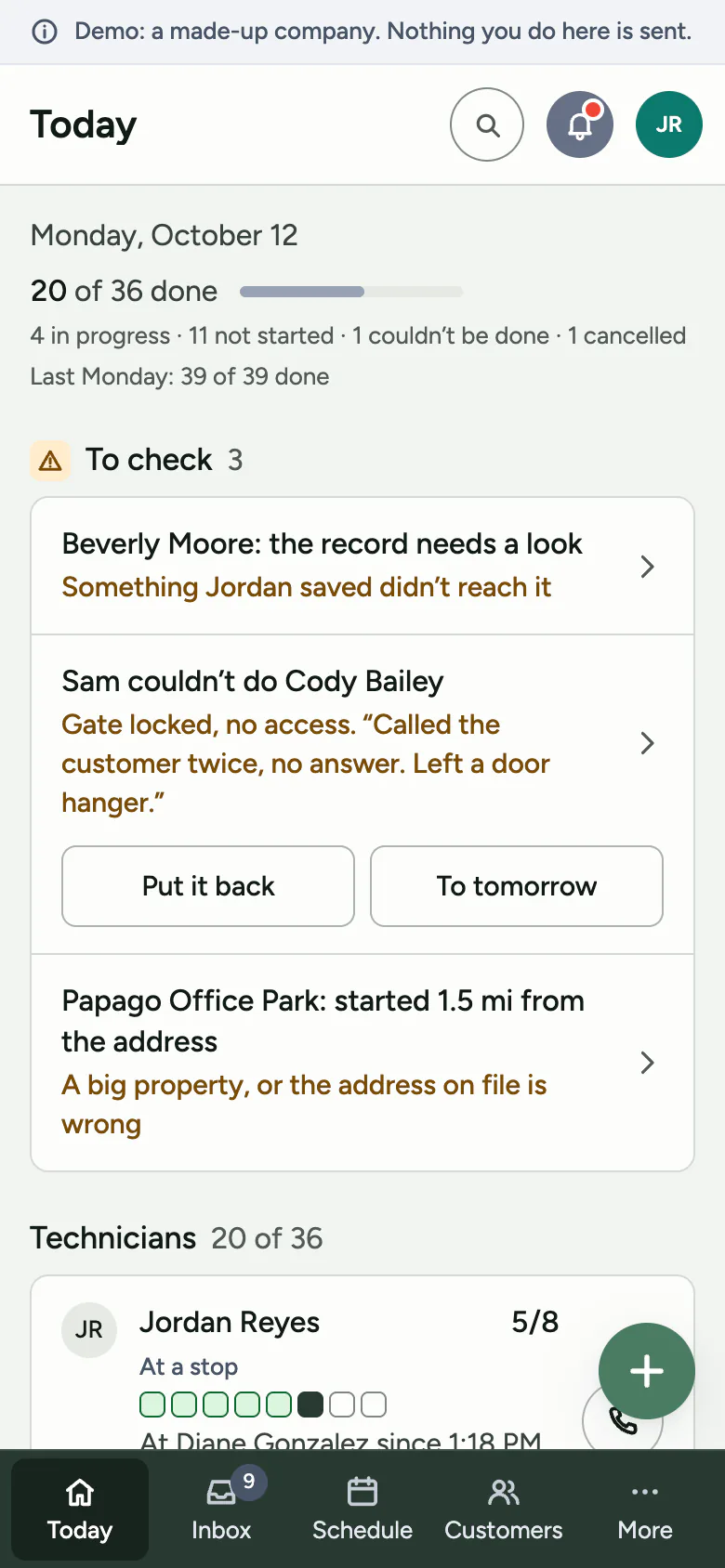
The owner’s app shows the day: who’s working, who’s behind, what’s billed, collected and owed.
- Stops on a map.The office sees each tech’s stops on a map, with each tech at a stop, between stops or behind. It’s worked out from their stops. Nothing tracks the phone.
- Callbacks, by tech.On the office website’s Reports: the share of each tech’s visits that brought one back, so you know who to coach.
- Renewals and who might leave.Termite bonds coming up, and customers whose last weeks went wrong, each with the reason in plain words.
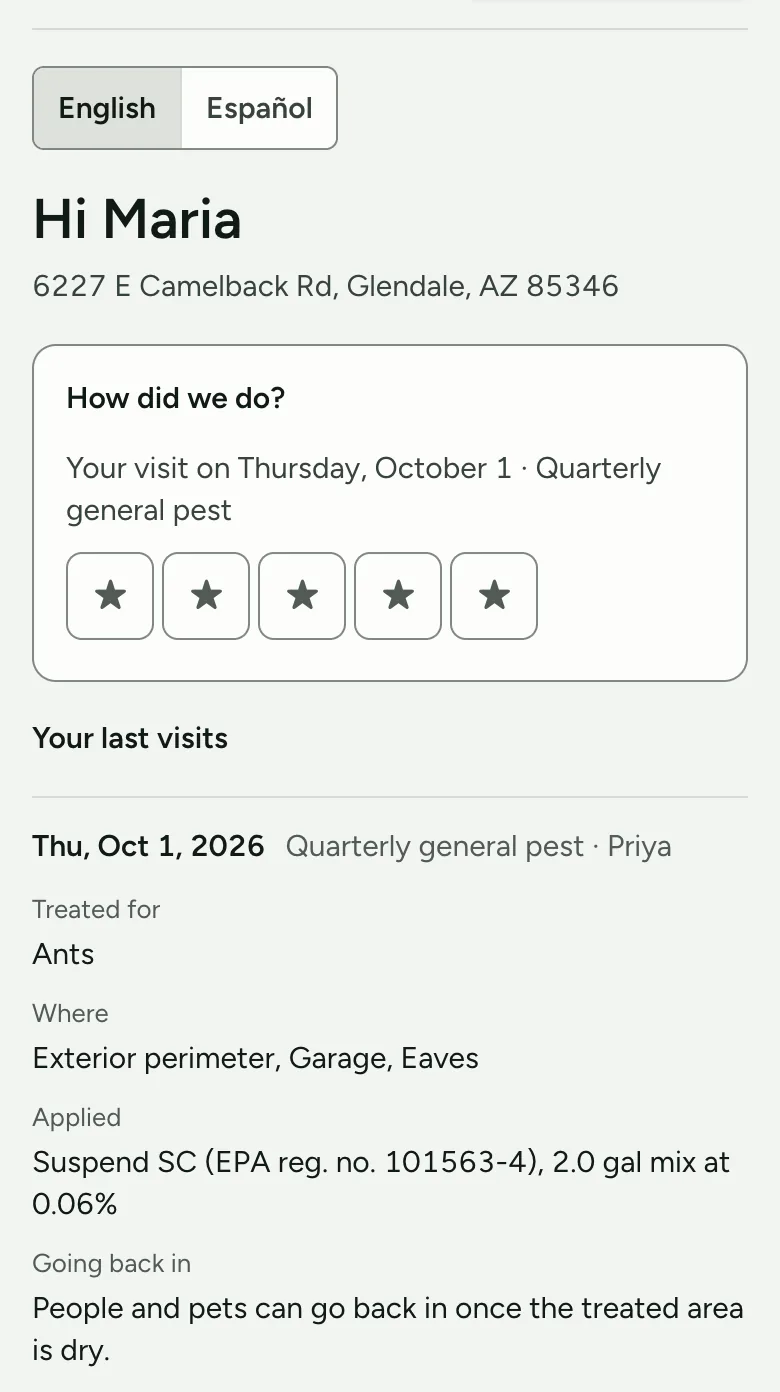
- Your customer’s own page.A link, no password: their next visit, what was treated and when people and pets can go back in (the product label’s words), a star rating for the visit, and a button to ask to move it. It doesn’t show prices or the office’s own notes. It does show the notes your tech writes on a visit.
We’re a small Arizona team, and we’re new.
We have no customers yet, so there are no reviews of us to show you. You’d be one of the first few, and the first few start free while we set them up.
Your old system keeps running beside Barrierline until you pick the day to stop it. Write to help@barrierline.com.
Open the demo. Tap around the way a tech would.
Both demos run a made-up company with made-up customers, and there’s nothing to sign up for. Please don’t type in real customer details.
